The comprehensive Programming course for designing, programming, and mastering original arcade software on the Neo Geo hardware. Covers bare-metal register control, the high-performance NeoGeoSDK 2D Game Engine, and the multi-channel Yamaha YM2610 sound driver.
Official Release: NeoGeoSDK v1.7.0Published by Eagle SoftwareFull Hardware & API Reference
Chapter 01
Preface & Course Scope
This course provides a comprehensive, rigorous technical foundation for software development on the SNK Neo Geo hardware architecture. Originally introduced in 1990 for arcade operators as the Multi Video System (MVS) and home enthusiasts as the Advanced Entertainment System (AES), the Neo Geo remains one of the most powerful and distinctive 2D sprite-based architectures in computing history.
This technical guide is written for systems programmers, game developers, and embedded software engineers who wish to build robust, high-performance cartridge software. It covers the machine from two complementary perspectives:
1. Direct Hardware Architecture
A rigorous breakdown of the silicon: Motorola 68000 bus timing, memory maps, Z80 co-processing, LSPC line-sprite rendering, VRAM timing windows, hardware auto-animation, color palette word encoding, and cabinet interrupt arbitration.
2. The NeoGeoSDK Framework
The modern, production-grade C engineering stack developed by Eagle Software. Covers the 35 modules of the 2D Game Engine (sdk/2d_engine/), VBlank deferred render queues, compound sprite group management, and the multi-channel YM2610 audio driver.
Unlike modern graphics systems that rely on 3D framebuffers and shader pipelines, the Neo Geo features no traditional frame buffer and no background tile planes. Every visual element on screen—from full-screen parallax backdrops and gigantic bosses down to individual projectiles—is composed of 16-pixel-wide hardware sprite strips evaluated in real-time on a line-by-line basis. Mastering the Neo Geo requires thinking in line buffers, fixed-point math, scanline budgets, and vertical blanking deadlines.
Official Repositories & Distribution
This documentation is maintained in conjunction with NeoGeoSDK v1.7.0. The official SDK repository is hosted at github.com/eaglesoftware777/neogeosdk. Commercial development tools, hardware research, and official releases are published at eaglesoftware.biz.
Chapter 02
System Architecture & Silicon Topology
The Neo Geo architecture is founded on a dual-processor topology supported by specialized custom ASICs designed to offload video generation, audio playback, bus arbitration, and arcade cabinet administration.
The primary CPU is a Motorola 68HC000 running at 12.000 MHz. It has a 16-bit external data bus, a 24-bit external address bus (providing 16 MB of direct linear address space), and internal 32-bit data and address registers (D0-D7, A0-A7). On Neo Geo cartridge hardware, user software runs strictly in Supervisor Mode, giving direct access to privileged instructions and all memory-mapped hardware registers.
2. Zilog Z80 (Audio Co-Processor)
Audio is isolated on an independent subsystem powered by a Zilog Z80 microprocessor operating at 4.000 MHz. The Z80 possesses its own dedicated 16-bit address space, 2 KB of high-speed static scratchpad RAM at $F800–$FFFF, and access to bank-switched M1 ROM. The 68000 does not interact with the Yamaha sound chip directly; it communicates exclusively by writing 8-bit command bytes into a hardware latch at $320000.
3. Custom Support Chipsets
LSPC2-A2 (Line Sprite Processor): The core video processor. Manages internal 68 KB VRAM, addresses external C-ROM (sprite graphics) and S-ROM (FIX text), renders 381 sprite strips into dual scanline buffers, drives raster interrupt timers, and outputs pixel indices to Palette RAM.
PRO-CT0 / PRO-B0 / NEO-B1 / NEO-C1: System bus decoders and system controllers across different board revisions. They decode memory maps, manage the hardware watchdog timer, handle joystick input ports, and coordinate the 68000-to-Z80 communication latch.
NEO-E0: Interrupt vector multiplexer. Automatically swaps the 68000 CPU vector table between the motherboard BIOS and the cartridge program ROM.
NEO-F0 (MVS Cabinets): Arcade I/O ASIC. Controls the coin lockout solenoids, mechanical coin meters, test/service switches, hardware DIP switches, battery-backed calendar RTC (uPD4990A), and multiplexed 7-segment LED credit displays.
NEO-ZMC / NEO-ZMC2: High-speed memory mapping ASICs mounted on the cartridge CHA and PROG boards to handle Z80 bank-switching and ADPCM sample addressing.
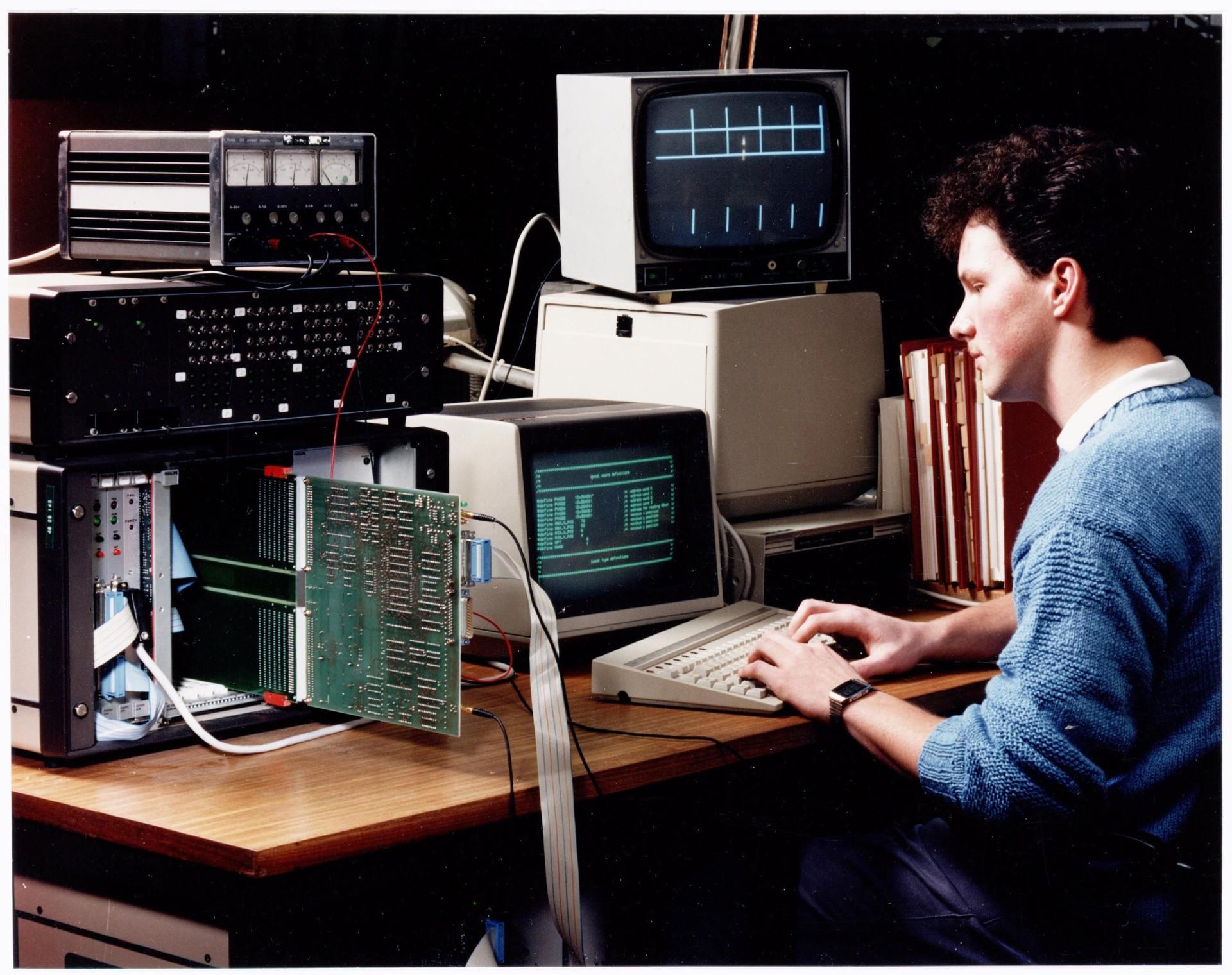
Fig. 1. Hardware engineering laboratory: cathode-ray monitors, test instruments, and 68000 target system boards.
4. Bus Timing and Wait States
The 68000 executes basic bus cycles in 4 clock ticks (333.3 ns at 12 MHz). However, the video processor (LSPC) and certain system registers impose hardware wait states:
Access Target
Bus Width
Wait States
Engineering Note
P-ROM Bank 0 ($000000)
16-bit
0 cycles
Full speed program execution.
User Work RAM ($100000)
16-bit
0 cycles
Zero wait-state fast 64 KB SRAM.
LSPC VRAM Data ($3C0002)
16-bit
12–16 cycles
Synchronized with internal LSPC memory slots. Modulo auto-increments.
Palette RAM ($400000)
16-bit
0–2 cycles
Direct write; writing during active display produces visual noise (snow).
Memory Card ($800000)
8-bit
2–4 cycles
JEIDA card bus. Even bytes return $FF.
Chapter 03
Memory Maps & System Address Spaces
Understanding the exact 24-bit physical memory layout is essential for robust software architecture. The Neo Geo address space is divided into program ROM, high-speed work RAM, memory-mapped system I/O, video registers, palette storage, and non-volatile backup memory.
Motorola 68000 Physical Address Map
Address Range
Capacity
Designation
Function & Description
$000000–$0FFFFF
1,048,576 B
P-ROM Bank 0
Cartridge program ROM. Exception vector table at $0000–$03FF. Cartridge header at $0100.
$100000–$10F2FF
62,208 B
USER WORK RAM
Fast static RAM dedicated to game variables, engine pools, stack, and heap.
$10F300–$10FFFF
3,328 B
BIOS WORK RAM
Reserved exclusively for System BIOS OS variables, joystick state buffers, and coin accounting.
$200000–$2FFFFF
1,048,576 B
P-ROM Bank 1
Second 1 MB cartridge code bank, or bankswitched window for multi-megabyte titles.
128 KB System Motherboard ROM containing boot routines, font, and OS services.
$D00000–$D0FFFF
65,536 B
BACKUP NVRAM
MVS only: Battery-backed SRAM for arcade operator soft DIPs and financial bookkeeping.
Critical Hardware Fact: The Backdrop Register
The active backdrop color register is hardwired to $401FFE (the final word of Palette Bank 0). The address $402000 is an inactive address mirror that will produce no change on physical silicon. Always use the SDK helper setBACKDROP(color) or write directly to $401FFE.
Music sequence streams, MML tables, instrument definitions.
$C000–$DFFF
8,192 B
Switchable Bank 2
Audio patch voice libraries, FM operator definitions.
$E000–$EFFF
4,096 B
Switchable Bank 1
Secondary sample sequence tables.
$F000–$F7FF
2,048 B
Switchable Bank 0
Dynamic banking bank window.
$F800–$FFFF
2,048 B
Z80 Work RAM
Driver scratchpad RAM, command ring buffer, channel status, volume matrices.
LSPC Video Processor VRAM Map (68 KB)
The LSPC manages an internal 16-bit wide video memory consisting of 68,416 words. The 68000 accesses VRAM indirectly by loading an address into REG_VRAMADDR ($3C0000) and transferring words through REG_VRAMRW ($3C0002):
VRAM Word Address
Block Name
Functionality
$0000–$6FFF
SCB1 (Slow VRAM)
Sprite tile indices and attributes (381 sprites x 32 tiles = 12,192 words x 2 words per tile).
$7000–$77FF
FIX Map
Overlay text matrix (40 columns x 32 rows = 1,280 words). High nibble selects palette (0-15).
Vertical position (bits 15-7), sticky chain flag (bit 6), and active tile height (bits 5-0).
$8400–$85FF
SCB4 (Fast VRAM)
Horizontal screen position (bits 15-7). Torus wrap arithmetic at 512 pixels.
$8600–$86FF
Scanline Sprite Tables
Internal active line-sprite evaluation buffers populated automatically by the LSPC.
Chapter 04
Cartridge Architecture & ROM Layout
A standard Neo Geo cartridge consists of two distinct printed circuit boards (PCBs) housed within a rugged plastic shell: the PROG Board and the CHA Board. The cartridge interfaces with the Neo Geo motherboard via two 100-pin edge connectors (200 pins total).
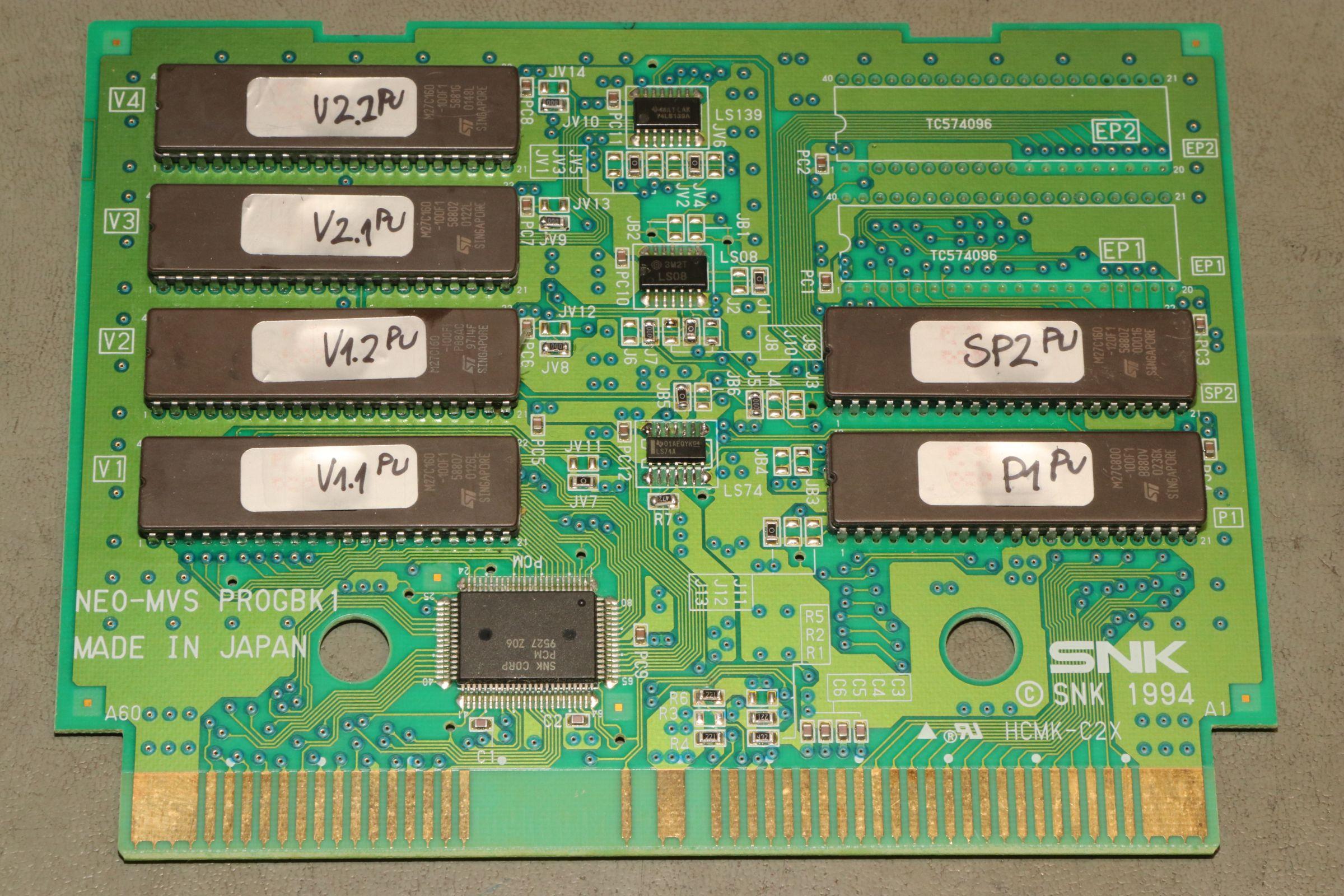
Fig. 2. The dual-board architecture. Left: PROG board with 68000 code and ADPCM samples. Right: CHA board with sprite C-ROMs, FIX S-ROM, and Z80 M-ROM.
ROM Types and Roles
ROM Type
Extension
Host Board
Bus Width
Description & Purpose
P-ROM
.p1, .p2
PROG
16-bit
Motorola 68000 machine code. Word-addressed. In MAME, bytes are interleaved/swapped.
V-ROM
.v1, .v2
PROG
8-bit
Yamaha ADPCM sample data. Divided into ADPCM-A and ADPCM-B sample spaces.
C-ROM
.c1, .c2...
CHA
32-bit (pair)
16x16 4 bpp sprite graphic tiles. Interleaved across odd/even ROM pairs.
S-ROM
.s1
CHA
8-bit
8x8 4 bpp FIX layer font and UI tiles. Standard size is 128 KB.
M-ROM
.m1
CHA
8-bit
Z80 audio driver program, MML music sequence tables, and sound effects definitions.
C-ROM Planar Interleaving
Sprite tiles are 16x16 pixels at 4 bits per pixel (128 bytes per tile). In the cartridge hardware, bitplanes are physically divided across paired ROM chips to supply 32 bits of tile data in a single clock cycle:
Pixel Bitplanes: Bit 0 & Bit 1 ======> ODD C-ROM (e.g. C1, C3)
Bit 2 & Bit 3 ======> EVEN C-ROM (e.g. C2, C4)
Tile Memory Organization:
- 16x16 tile is divided into four 8x8 quadrants.
- Quadrant order: Top-Right, Bottom-Right, Top-Left, Bottom-Left.
- Pixels are packed into 16-bit words representing bitplanes.
The Artbox pipeline in the NeoGeoSDK automatically converts standard PNG graphics into this interleaved planar layout during make art, eliminating manual bit-shifting.
Chapter 05
The System BIOS & The USER Subroutine
Unlike PC software that initializes through a linear main() entry point, a Neo Geo game cartridge functions as an embedded state machine managed by the System BIOS. The BIOS initializes hardware registers, displays the boot eyecatcher, services the MVS test menu, and invokes the game code through the USER subroutine.
The USER Dispatch Protocol
When the BIOS yields control to the cartridge, it jumps to the game's user() entry point and passes a request code in the byte register BIOS_USER_REQUEST ($10FDAE):
Code
Name
Required Action by the Game
0
USER_INIT
Initialize soft DIP defaults, clear game state, reset progress. Interrupts are disabled. Must kick watchdog! Set BIOS_USER_MODE = 0.
Execute the attract mode demonstration reel. On AES, this also serves as the title screen until the player presses Start.
3
USER_TITLE
MVS arcade title screen after coin insertion. Must poll BIOS_COMPULSION_TIMER ($10FDDA) to auto-start if operator sets timer.
When the game finishes its requested routine, it does not execute a simple assembly rts. It must perform a jump back to the BIOS return vector: jmp BIOSF_SYSTEM_RETURN.
Essential BIOS System Variables
Address
Symbol
Description
$10FD80
BIOS_SYSTEM_MODE
Write $80 to claim VBlank interrupt processing for the game. Value 0 keeps VBlank in BIOS.
$10FD82
BIOS_MVS_FLAG
System indicator: 0 = AES Home Console; 1 = MVS Arcade Cabinet.
$10FD83
BIOS_COUNTRY_CODE
Region flag: 0 = Japan; 1 = USA; 2 = Europe.
$10FDAF
BIOS_USER_MODE
Game state: 0 = Init/Splash; 1 = Demo/Title; 2 = Active In-Game Play.
Countdown timer decremented by BIOS during title screen. Auto-starts game when it reaches zero.
Standard Cartridge Header ($100–$120)
/* Standard Neo Geo Cartridge Header layout in P-ROM */__attribute__((section(".header")))
const NeoGeoHeader game_header = {
.magic = { 'N', 'E', 'O', '-', 'G', 'E', 'O', 0x00 }, /* Must match "NEO-GEO" */
.ngh_id = 0x0777, /* Unique NGH Game ID */
.rom_size = 0x0020, /* Program ROM size in 128KB units */
.backup_size = 0x0001, /* Backup RAM requirements */
.eyecatch_flag = 0x0000, /* 0 = Standard BIOS Logo, 1 = Custom Logo */
.security_code = { 0x00, 0x00, 0x00, 0x00 } /* BIOS hardware protection verification */
};
Chapter 06
Interrupts, Vertical Blank & The Hardware Watchdog
Execution timing on the Neo Geo is dictated by hardware interrupts synchronized with the CRT cathode beam. Managing these interrupts correctly ensures tear-free visuals, jitter-free input polling, and prevents the hardware watchdog from resetting the system.
Motorola 68000 Autovector Interrupts
Interrupt
Vector
Source
Hardware Frequency
Engineering Duty
IRQ Level 1
$0064
Vertical Blank (VBlank)
59.18 Hz (NTSC) / 50.0 Hz (PAL)
Drives game frame tick, kicks watchdog, drains VRAM/palette render queue.
IRQ Level 2
$0068
LSPC Line Raster Timer
Programmable scanline
Mid-frame raster effects (split-screen scroll, water reflections, palette changes).
IRQ Level 3
$006C
Auxiliary / Cabinet
Edge trigger
Acknowledge immediately; reserved on standard cartridge hardware.
Interrupts must be acknowledged by writing to REG_IRQACK at $3C000C. Bit 0 acknowledges IRQ1 (VBlank), Bit 1 acknowledges IRQ2 (Timer), and Bit 2 acknowledges IRQ3.
The Hardware Watchdog
To prevent unattended arcade cabinets from freezing indefinitely in commercial environments, the system hardware includes an integrated watchdog counter. If the game fails to access the watchdog register within approximately 128 milliseconds (~7.5 video frames), the hardware asserts an unmaskable system reset line, immediately rebooting the machine.
Servicing the Watchdog
Writing to REG_DIPSW ($300001) clears the watchdog timer. In C, always call the SDK macro kickWatchDog():
Must be called once per frame inside the Vertical Blank handler.
Must be called inside any extended loading, decompression, or memory clearing loops that run with interrupts disabled.
Must be called during the USER_INIT BIOS callback before initializing subsystem variables.
In NTSC mode, a complete frame lasts 16.67 milliseconds (262 total scanlines). The active display occupies scanlines 0 through 223 (13.67 ms). The vertical blanking interval (VBlank) spans scanlines 224 through 261 (approx. 3.00 ms). Heavy VRAM operations and all palette updates must be completed within this ~3.0 ms window to prevent visible visual tearing and color snow.
Chapter 07
Video Architecture & The LSPC Line-Sprite Processor
The Neo Geo does not utilize a conventional linear frame buffer or tilemap-based scrolling background planes. Instead, the video system is powered by the custom LSPC2-A2 (Line Sprite Processor) ASIC, which composites graphics line-by-line using dual high-speed internal line buffers.
Fig. 3. The Line Sprite Processor compositing multiple large character strips and parallax scenery in real time.
The Line-Buffer Architecture
While Scanline N is being transmitted as analog RGB to the CRT monitor from Line Buffer A, the LSPC scans its active sprite list in VRAM and fetches 4 bpp pixel data from C-ROM and S-ROM to render Scanline N+1 into Line Buffer B. At the horizontal blanking interval, the roles of the two line buffers swap.
Resolution
320 x 224 visible pixels (NTSC) or 320 x 256 visible pixels (PAL), output as standard 15 kHz 240p RGB video.
Sprite Capacity
381 active sprite strips on screen simultaneously. Each strip is 16 pixels wide and up to 512 pixels tall.
Scanline Limits
A maximum of 96 sprite strips can be composited per scanline. Any 97th sprite on that scanline is dropped by hardware.
Hardware Sprite Priority
Hardware Law: Higher Slot Renders in Front
On physical Neo Geo hardware, sprite priority is determined strictly by the sprite slot index:
A higher sprite slot number is rendered in front of a lower sprite slot number.
Slots 1–32: Background parallax scenery.
Slots 33–95: Secondary props, items, and mid-ground terrain.
Slots 96–223: Primary characters, players, and large bosses.
Slots 224–287: Foreground visual effects, projectiles, and particle systems.
Slot 0: Reserved / unused by convention.
Direct LSPC Hardware Registers ($3C0000–$3C000E)
Address
Register
Access
Function
$3C0000
REG_VRAMADDR
Write
Sets the target 16-bit internal VRAM word address.
$3C0002
REG_VRAMRW
Read / Write
Transfers data into/out of VRAM. Automatically applies modulo increment.
$3C0004
REG_VRAMMOD
Write
Sets auto-increment step: commonly +1 for linear data, or +64 for vertical tile strips.
$3C0006
REG_LSPCMODE
Write
Controls auto-animation divider clock and programmable raster timer modes.
$3C0008
REG_TIMERHIGH
Write
Raster line interrupt timer counter (upper bits).
$3C000A
REG_TIMERLOW
Write
Raster line interrupt timer counter (lower bits).
$3C000C
REG_IRQACK
Write
Acknowledges active interrupts (Bit 0: VBlank, Bit 1: Timer, Bit 2: IRQ3).
Chapter 08
Color Palettes, Word Formats & Display Timing
The Neo Geo color pipeline is managed by an integrated 16 KB Palette RAM divided into two selectable banks of 256 palettes each. Each palette contains 16 colors, providing 4,096 simultaneous colors on screen out of a master hardware color space of 8,192 colors.
16-Bit Color Word Encoding
Each color in Palette RAM is stored as a 16-bit big-endian word featuring a master luminance Dark bit (D) and three 4-bit color primaries (Red, Green, Blue):
Bit: 15 14 13 12 11 10 9 8 7 6 5 4 3 2 1 0
+---+---------------+---------------+-------------+---------------+
| D | R3 R2 R1 R0| G3 G2 G1 G0| 0 0 0 | B3 B2 B1 B0|
+---+---------------+---------------+-------------+---------------+
D (Bit 15): Dark Bit. When 0, darkens the color output by approximately 50%.
R (Bits 14-11): 4-bit Red component (values 0-15).
G (Bits 10-7): 4-bit Green component (values 0-15).
Bits 6-4: Must always be written as 000.
B (Bits 3-0): 4-bit Blue component (values 0-15).
Palette Banking & Special Registers
Palette Banks: The system features two 16 KB banks. Writing to $3A000F activates Palette Bank 0; writing to $3A001F activates Palette Bank 1.
Color Index 0 (Transparency): Index 0 of every palette is transparent when evaluated by the LSPC compositor. By SNK hardware convention, index 0 is initialized to $8000 (reference black).
Backdrop Color: When no sprite or FIX tile covers a pixel, the LSPC displays the backdrop color stored at address $401FFE.
Preventing Palette Snow: Writing to Palette RAM while the cathode ray is scanning out active pixels causes high-frequency bus contention that appears as white dots ("snow") across the display. All palette updates, fades, and color flashes must be executed strictly during Vertical Blank.
Chapter 09
The FIX Layer Architecture
The FIX layer is an independent, non-scrolling character matrix dedicated to head-up displays (HUD), player scores, dialogue subtitles, coin counters, and system menus. It is always rendered in front of all 381 sprite strips.
Matrix Dimensions and Memory Layout
The FIX layer consists of a grid of 40 columns by 32 rows of 8x8 pixel tiles (4 bpp), mapped directly into internal VRAM starting at word address $7000.
Property
Specification
Engineering Detail
Grid Dimensions
40 columns x 32 rows
1,280 total character cells.
Visible Resolution
320 x 224 pixels
Top 2 rows and bottom 2 rows are concealed in standard CRT overscan.
Coordinate Mapping
y_mem = y_screen + 2
The first visible scanline corresponds to row 2 in VRAM. Row 0 is in the upper blanking margin.
Palette Allowance
Palettes 0 through 15 only
Bits 15-12 of the FIX word encode the palette. Palettes 16-255 cannot be used.
Cell Word Format
(pal << 12) | tile_id
12-bit tile index allows addressing up to 4,096 8x8 glyphs in S-ROM.
Motherboard SFIX vs Cartridge S1 ROM
The system motherboard contains an internal SFIX ROM used by the BIOS for service tests, while the cartridge CHA board carries the game's custom S1 ROM. Writing to $3A000B (BRDFIX) routes FIX lookups to the motherboard BIOS ROM, while writing to $3A001B (CRTFIX) restores the cartridge S1 ROM. Whenever the game calls the BIOS routine SYS_FIX_CLEAR, it must immediately write CRTFIX to restore access to its custom game typography.
The Opaque Space Bug
The default space character (ASCII 32) in the standard BIOS font is rendered as a solid, opaque rectangular box of color index 2. If a game prints a space glyph to "erase" text, it will draw an opaque rectangle over the background sprites. To clear a cell transparently, write tile index 0 with palette 0 using ng_fix_blank_cell().
Chapter 10
Hardware Sprites: SCB1, SCB2, SCB3, and SCB4
Every moving actor, background plane, and projectile on the Neo Geo is constructed from vertical sprite strips. Each strip is exactly 16 pixels wide and contains from 1 to 32 stacked 16x16 tiles. The hardware attributes of all 381 sprite strips are managed across four Sprite Control Blocks (SCB1–SCB4) in VRAM.
The Four Sprite Control Blocks
Control Block
VRAM Address
Encoding & Bit Definitions
SCB1 (Tile & Attributes)
$0000–$6FFF
Two words per tile: Word 0: Lower 16 bits of tile index in C-ROM. Word 1: Palette index (bits 15-8), Auto-Anim (bits 7-6), Vertical Flip (bit 1), Horizontal Flip (bit 0), Tile Index MSBs (bits 3-2).
SCB2 (Shrink Factors)
$8000–$81FF
One word per strip: Bits 15-12: Horizontal shrink coefficient (values 0–15, where 15 = 100% full width). Bits 7-0: Vertical shrink coefficient (values 0–255, where 255 = 100% full height).
SCB3 (Y Pos & Height)
$8200–$83FF
One word per strip: Bits 15-7: Vertical screen position encoded as (496 - Y) & 0x1FF. Bit 6: Sticky Bit (chains strip to preceding sprite strip). Bits 5-0: Active tile height (1 to 32 tiles).
SCB4 (X Position)
$8400–$85FF
One word per strip: Bits 15-7: Horizontal screen position encoded as (X & 0x1FF) << 7. Wraps on a 512-pixel circular torus.
Hardware Sprite Chaining (The Sticky Bit)
To construct compound sprites wider than 16 pixels (such as a 64x64 pixel boss), multiple adjacent sprite strips are chained together horizontally. Strip 0 acts as the Driver Strip, defining the base X position, Y position, active tile height, and vertical shrink. Subsequent follower strips set Bit 6 (Sticky Bit) in SCB3. Follower strips automatically inherit the Y position, tile height, and vertical shrink of the driver strip, eliminating the need to update Y coordinates across multi-strip actors every frame.
Asymmetric Scaling: The NG_SCALE Macro
The Neo Geo hardware scales sprites by dropping columns and rows, but the X and Y axes are encoded with different precision:
The X axis has 16 discrete shrink steps (encoded in bits 15-12).
The Y axis has 256 discrete shrink steps (encoded in bits 7-0).
Writing the same raw value to both axes will result in distorted, non-square scaling. The NeoGeoSDK provides the NG_SCALE(n) macro in sdk/2d_engine/ng_defs.h, which calculates proportional, aspect-correct values for both axes simultaneously.
Chapter 11
Cabinet I/O, Player Controls & Coin Systems
The Neo Geo system interfaces with arcade cabinet controls, coin doors, memory cards, and non-volatile operator memory through memory-mapped I/O registers arbitrated by the NEO-C1 and NEO-F0 custom gate arrays.
Controller Input Ports
Player inputs are exposed at $300000 (Player 1) and $340000 (Player 2). All button and directional lines are active-low (a pressed switch pulls the bit to logic 0):
Port $300000 (Player 1) / $340000 (Player 2):
Bit 0: Up Bit 4: Button A
Bit 1: Down Bit 5: Button B
Bit 2: Left Bit 6: Button C
Bit 3: Right Bit 7: Button D
Port $380000 (REG_STATUS_B):
Bit 0: P1 Start Bit 4: Memory Card Inserted (0 = Present)
Bit 1: P1 Select Bit 5: Memory Card Write-Protected
Bit 2: P2 Start Bit 7: MVS Hardware Mode (0 = AES Home, 1 = MVS Arcade)
Bit 3: P2 Select
Arcade Coin & Credit Accounting
On MVS arcade hardware, coin handling is governed by the BIOS to ensure operator auditing integrity. When a coin passes through the mechanical coin switch, the BIOS increments hardware coin counters, drives the coin lockout coils (which physically reject coins when max credits are reached), triggers the game's COIN_SOUND callback, and records financial statistics in battery-backed Backup NVRAM at $D00000. User games must never decrement credits directly; they must call the documented BIOS credit decrement service BIOS_CREDIT_DEC.
Chapter 12
Direct Hardware Register Programming
Writing software at the bare-metal level requires mastering direct register communication with the LSPC video processor, configuring auto-increment modulos, programming the raster interrupt timer, and loading color palettes during Vertical Blank.
1. VRAM Addressing & Modulo Auto-Increment
The LSPC exposes two 16-bit register ports for accessing VRAM: REG_VRAMADDR ($3C0000) and REG_VRAMRW ($3C0002). Writing a data word to REG_VRAMRW automatically advances the internal VRAM pointer by the step value set in REG_VRAMMOD ($3C0004). This hardware auto-increment allows high-speed burst writes without manually reloading addresses.
/* Direct register definitions for low-level access */#defineREG_VRAMADDR (*(volatile uint16_t *)0x3C0000)
#defineREG_VRAMRW (*(volatile uint16_t *)0x3C0002)
#defineREG_VRAMMOD (*(volatile uint16_t *)0x3C0004)
#defineREG_IRQACK (*(volatile uint16_t *)0x3C000C)
#defineREG_DIPSW (*(volatile uint8_t *)0x300001)
/* Burst clear all 381 sprite slots in VRAM */voidhw_clear_all_sprites(void) {
uint16_t i;
/* Clear SCB3 (Y position, sticky, height): VRAM $8200-$837D */REG_VRAMMOD = 1; /* Increment by +1 word per write */REG_VRAMADDR = 0x8200;
for (i = 0; i < 381; ++i) {
REG_VRAMRW = 0x0000; /* Height = 0, disabled */
}
/* Park SCB4 (X position) off-screen: VRAM $8400-$857D */REG_VRAMADDR = 0x8400;
for (i = 0; i < 381; ++i) {
REG_VRAMRW = (496 << 7); /* Park coordinate */
}
}
2. Low-Level Sprite Setup & Position Updates
The following routine configures a single 16-pixel wide vertical sprite strip consisting of 4 stacked 16x16 tiles in SCB1, sets full size in SCB2, vertical position in SCB3, and horizontal position in SCB4:
voidhw_spawn_sprite_strip(uint16_t slot, int16_t x, int16_t y,
uint16_t base_tile, uint8_t pal_idx, uint8_t height) {
uint16_t t;
uint16_t scb1_addr = slot * 64; /* 32 tiles x 2 words per tile = 64 words *//* 1. Populate SCB1 tile indices and attribute words */REG_VRAMMOD = 1;
REG_VRAMADDR = scb1_addr;
for (t = 0; t < height; ++t) {
REG_VRAMRW = base_tile + t; /* Tile index LSB */REG_VRAMRW = ((uint16_t)pal_idx << 8); /* Palette + flags */
}
/* 2. Configure SCB2: Full width (0x0F) and full height (0xFF) */REG_VRAMADDR = 0x8000 + slot;
REG_VRAMRW = (0x0F << 8) | 0xFF;
/* 3. Configure SCB3: Y position = (496 - y), no sticky, height in tiles */REG_VRAMADDR = 0x8200 + slot;
REG_VRAMRW = (((496 - y) & 0x1FF) << 7) | (height & 0x3F);
/* 4. Configure SCB4: X position = (x << 7) */REG_VRAMADDR = 0x8400 + slot;
REG_VRAMRW = ((x & 0x1FF) << 7);
}
/* Ultra-fast position update: touches only SCB4 (X) and SCB3 (Y) */voidhw_move_sprite_fast(uint16_t slot, int16_t x, int16_t y, uint8_t height) {
REG_VRAMADDR = 0x8400 + slot;
REG_VRAMRW = ((x & 0x1FF) << 7);
REG_VRAMADDR = 0x8200 + slot;
REG_VRAMRW = (((496 - y) & 0x1FF) << 7) | (height & 0x3F);
}
3. Dynamic Palette Loading & Smooth Color Fading
The following function uploads a 16-color palette directly into Palette RAM and demonstrates calculating intermediate brightness steps for a fade-to-black effect:
#definePALETTE_RAM_BASE ((volatile uint16_t *)0x400000)
#defineREG_BACKDROP (*(volatile uint16_t *)0x401FFE)
voidhw_load_palette(uint8_t pal_index, constuint16_t *src_colors) {
volatileuint16_t *dst = PALETTE_RAM_BASE + (pal_index * 16);
uint8_t i;
for (i = 0; i < 16; ++i) {
dst[i] = src_colors[i];
}
}
/* Real-time color fade step: scales RGB primaries toward black */uint16_thw_fade_color(uint16_t color, uint8_t step, uint8_t max_steps) {
uint16_t r = (color >> 11) & 0x0F;
uint16_t g = (color >> 7) & 0x0F;
uint16_t b = color & 0x0F;
uint16_t d = color & 0x8000; /* Dark bit */
r = (r * step) / max_steps;
g = (g * step) / max_steps;
b = (b * step) / max_steps;
return d | (r << 11) | (g << 7) | b;
}
4. Programmable Raster Line Timer (IRQ2)
The LSPC can trigger Level 2 autovector interrupts at an exact CRT scanline. This allows mid-screen palette bank swaps, split-screen scrolling, or water reflections without CPU polling.
#defineREG_TIMERHIGH (*(volatile uint16_t *)0x3C0008)
#defineREG_TIMERLOW (*(volatile uint16_t *)0x3C000A)
#defineREG_LSPCMODE (*(volatile uint16_t *)0x3C0006)
voidhw_setup_raster_timer(uint16_t scanline) {
/* Configure LSPC raster timer to fire at specific line */REG_TIMERHIGH = 0x0000;
REG_TIMERLOW = scanline;
REG_LSPCMODE |= 0x0080; /* Enable line timer interrupt mode */
}
/* Level 2 Interrupt Service Routine (called automatically at target scanline) */__attribute__((interrupt)) voidirq2_raster_handler(void) {
/* Perform split-second raster modification (e.g. shift backdrop to water color) */REG_BACKDROP = 0x0008; /* Dark blue water *//* Acknowledge Level 2 interrupt */REG_IRQACK = 0x0002;
}
Chapter 13
The Bare-Metal Hello World & Bring-Up Pipeline
Before integrating complex sprite hierarchies, every Neo Geo engineer begins with a minimal viable cartridge ROM. The Hello World specimen establishes the BIOS USER contract, clears hardware state, prints text to the FIX layer, kicks the watchdog, and verifies sound triggering.
Minimal Bootable Program
#include"sdk/neogeo.h"voidgame_attract(void) {
/* 1. Initialize audio subsystem and hardware state */
soundInit();
clearSprs();
clearFix();
setBACKDROP(0x0000); /* Pitch black backdrop *//* 2. Print initial diagnostics on the FIX text layer */
fixtext_out(6, 8, "EAGLE SOFTWARE NEOGEOSDK", 0);
fixtext_out(6, 10, "BARE-METAL SYSTEM BRING-UP", 1);
fixtext_out(6, 12, "WATCHDOG: ACTIVE [60 HZ]", 0);
/* 3. Trigger initial confirmation audio sample */
playSFX(0);
/* 4. Closed frame heartbeat loop */for (;;) {
waitVbl(); /* Wait for Vertical Blanking Interval */
kickWatchDog(); /* Clear the hardware watchdog counter */
}
}
The Five Verification Milestones
Compile Cartridge ROMs: Run make GAME=helloworld all. Verify generation of 772-p1.p1 (68k code), 772-c1.c1 (sprites), 772-s1.s1 (FIX tiles), 772-m1.m1 (Z80 driver), and 772-v1.v1 (samples).
Launch Under MAME: Execute make GAME=helloworld test. Confirm the BIOS eyecatcher plays, followed by the crisp text display.
Coin and Start Input: In MVS mode, press 5 to deposit a virtual coin. Verify credit counter increments and COIN_SOUND fires cleanly.
Watchdog Stress Test: Deliberately comment out kickWatchDog() in a test build; verify that MAME resets the CPU after ~7.5 frames, proving the watchdog watchdog is armed.
Hot Text Patching: Modify the string in main.c, rebuild only the program binary with make p1, and confirm instantaneous reload.
Chapter 14
Engine Architecture & The VBlank Render Queue
The NeoGeoSDK 2D Game Engine (located in sdk/2d_engine/) is a modular, high-performance C99 framework designed to deliver arcade-grade visual spectacles while strictly respecting the physical limitations of the 68000 bus and LSPC line processor.
Core Engineering Principles
16.16 Fixed-Point Math
Zero floating-point instructions. All physics calculations, velocities, and projectile trajectories use 16.16 fixed-point arithmetic via ng_fixed.h.
Zero In-Game Allocation
No calls to malloc() or dynamic heap allocation during play. All character pools, particle buffers, and action tables are pre-allocated statically.
Zero Division in Frame Loops
Hardware division on the 68000 consumes up to 158 clock cycles. Division is replaced by bit-shifts, reciprocal multiplication, and lookup tables.
The 128-Slot Render Queue (ng_render_queue.h)
Writing directly to VRAM while gameplay logic runs causes visible tearing, because writes collide with the LSPC active line compositing pipeline. The NeoGeoSDK introduces a lock-free Render Queue that buffers visual update commands during the frame and flushes them in a rapid burst inside the 3.0 ms Vertical Blank window:
/* Render Queue command lifecycle */while (game_running) {
/* Phase 1: Logic & Physics (Active Display Scanlines 0-223) */
update_player_movement();
update_enemy_ai();
check_collisions();
/* Commands are queued, NOT written to hardware yet */
ng_rq_sprite_pos(hero_slot, hero_x, hero_y);
ng_rq_sprite_shrink(hero_slot, shrink_val);
/* Phase 2: Frame Sync & VBlank Queue Drain (Scanlines 224-261) */
waitVbl();
kickWatchDog();
ng_render_queue_flush(); /* Bursts up to 128 commands into VRAM within ~2 ms */
}
Render Queue Command Types
Command Constant
Payload
Hardware Target
VRAM Cost
NG_RQ_SPRITE_POS
slot, x, y
SCB4 (X) & SCB3 (Y)
2 words
NG_RQ_SPRITE_TILE
slot, tile_index
SCB1 lower word
1 word
NG_RQ_SPRITE_PAL
slot, palette_idx
SCB1 upper word
1 word
NG_RQ_SPRITE_SHRINK
slot, x_shrink, y_shrink
SCB2 shrink word
1 word
NG_RQ_SPRITE_HIDE
slot
SCB3 height = 0
1 word
NG_RQ_PAL_UPLOAD
palette_slot, color_array[16]
Palette RAM ($400000)
16 words
Chapter 15
Characters, NPCs & Action State Machines
Dynamic actors in the NeoGeoSDK are managed by the Character Subsystem (ng_chars.h) and driven by declarative action script tables (ng_actions.h).
The 64-Slot Character Pool
The engine maintains a static pool of 64 character instances (NGCharacter). Each character encapsulates:
Life States:NG_CHAR_LIFE_FREE, NG_CHAR_LIFE_ALLOCATED, NG_CHAR_LIFE_VISIBLE, NG_CHAR_LIFE_HIDDEN.
Character animations and state transitions are defined using compact command arrays, eliminating manual frame counters:
#include"sdk/2d_engine/ng_engine.h"/* Player Running Animation: sets horizontal speed, sequences 4 tiles, loops */static const NGActionCmd ACT_HERO_RUN[] = {
SPEED(FIX(2), 0), /* Advance at 2.0 pixels/frame */
FRAME(TILE_HERO_RUN_0, 4), /* Show tile for 4 video frames */
FRAME(TILE_HERO_RUN_1, 4),
FRAME(TILE_HERO_RUN_2, 4),
FRAME(TILE_HERO_RUN_3, 4),
LOOP() /* Repeat indefinitely */
};
/* Player Slash Attack: stops movement, plays SFX, activates weapon hitbox */static const NGActionCmd ACT_HERO_SLASH[] = {
SPEED(0, 0),
SOUND(SOUND_SFX_SLASH), /* Dispatches audio trigger to Z80 */
FRAME(TILE_HERO_PREPARE, 2),
HITBOX(16, -8, 32, 24), /* Activates hit_rect: x_off, y_off, w, h */
FRAME(TILE_HERO_SWING, 6),
HITBOX_OFF(), /* Deactivates strike volume */
FRAME(TILE_HERO_RECOVER, 4),
END() /* Transitions back to default state */
};
Chapter 16
Compound Sprite Groups & Hardware Chaining
Because individual Neo Geo sprites are vertical strips only 16 pixels wide, wide actors must be composed from multi-strip chains managed by ng_sprite_group.h.
Compound Actor (48x64 pixels = 3 horizontal strips x 4 vertical tiles):
+---------------+---------------+---------------+
| STRIP 0 | STRIP 1 | STRIP 2 |
| Driver Strip | Sticky Bit=1 | Sticky Bit=1 |
| X = 100 | Inherits Y | Inherits Y |
| Y = 150 | Inherits H | Inherits H |
| Height = 4 | Inherits V-Sc| Inherits V-Sc|
+---------------+---------------+---------------+
Dirty-Flag Optimization
Uploading an entire compound sprite group to VRAM requires writing dozens of words across SCB1, SCB2, SCB3, and SCB4. If executed every frame for multiple actors, VRAM bus bandwidth is quickly exhausted. The NGSpriteGroup structure maintains dirty tracking flags:
NG_SGF_DIRTY_POS: Only updates the driver strip's SCB4 (X) and SCB3 (Y). Cost: exactly 2 VRAM words! Follower strips update automatically via hardware sticky bits.
NG_SGF_DIRTY_SHRINK: Updates SCB2 shrink words across the strips using NG_SCALE().
NG_SGF_DIRTY_TILE: Updates SCB1 tile indices only when an animation frame advances.
/* Setup and movement of a 3-strip compound actor */
NGSpriteGroup boss_group;
voidinit_boss_graphics(void) {
ng_sprite_group_init(&boss_group, BOSS_SLOT_BASE, 3/* strips */, 4/* rows */);
ng_sprite_group_set_tile_base(&boss_group, TILE_BOSS_START);
ng_sprite_group_set_palette(&boss_group, PAL_BOSS_ID);
ng_sprite_group_set_scale(&boss_group, NG_SCALE(16), NG_SCALE(16)); /* 100% full size */
ng_sprite_group_upload(&boss_group); /* Full initial burst upload */
}
voidupdate_boss_position(int16_t new_x, int16_t new_y) {
/* Only marks DIRTY_POS; flush will write only 2 words */
ng_sprite_group_set_pos(&boss_group, new_x, new_y);
ng_sprite_group_flush(&boss_group);
}
Chapter 17
Dynamic Cameras, Parallax Scrolling & Pseudo-3D
The Camera Subsystem (ng_camera.h) and Level Module (ng_level.h) translate world-space game coordinates into screen-space sprite coordinates, supporting smooth parallax scrolling and pseudo-3D scaling effects.
Camera Modes & Features
Target Following with Dead Zones: The camera smoothly follows the player's 16.16 position while enforcing a customizable dead zone so micro-adjustments do not cause camera jitter.
Velocity Look-Ahead: Shifts the view ahead of fast-moving characters (e.g. supersonic aircraft in Sky Lance) so the player can anticipate approaching threats.
Trauma Screen Shake: A decaying sinusoidal offset function applied to camera scroll registers to simulate heavy impacts and explosions.
Axis Locking: Lock horizontal axis for vertical shooters, lock vertical axis for side-scrolling beat-'em-ups, or allow unrestricted omnidirectional scrolling.
Pseudo-3D Projection (ng_depthfx.h)
Because the LSPC hardware can dynamically shrink sprites from 100% down to 0.4%, the NeoGeoSDK includes a 3D perspective projection pipeline. World coordinates (X, Y, Z) are projected into screen coordinates with matching hardware shrink coefficients, enabling scaling boss approaches and 3D starfields:
/* Projecting a 3D object into 2D sprite space */voidrender_scaling_meteor(NGVec3 *pos, uint16_t slot) {
NGVec2 screen_pt;
uint8_t shrink;
/* Perspective divide: screen = center + (world / Z) */
ng_depth_project(pos, &screen_pt, &shrink);
if (shrink > 0) {
ng_rq_sprite_pos(slot, screen_pt.x, screen_pt.y);
ng_rq_sprite_shrink(slot, shrink);
} else {
ng_rq_sprite_hide(slot); /* Behind camera */
}
}
Chapter 18
Collision Detection, Physics & Game Feel
Juicy arcade gameplay depends on razor-sharp collision response, rigid platform physics, and visceral feedback mechanisms like freeze-frame hitstop, directional screen shake, and damage palette flashes.
Axis-Aligned Bounding Box (AABB) Intersection
The engine resolves hitbox collisions using integer comparison routines: ng_rect_hit(). Characters expose two distinct bounding rectangles:
ng_char_body_rect(c): The physical actor footprint used for world boundaries and obstacle collisions.
ng_char_hit_rect(c): The active weapon/projectile offensive hitbox, enabled dynamically during attack action script frames.
The Unified Impact System (ng_feedback.h)
When a decisive strike connects, calling ng_impact_event() orchestrates four coordinated physical feedback systems in a single call:
Feedback Mechanism
Engine Action
Psychological Impact
Hitstop (Freeze-Frame)
Halts game logic for 4–12 frames while keeping CRT refresh active.
Gives attacks weight and visceral kinetic resistance.
Directional Shake
Injects high-frequency trauma displacement into the camera offset.
Simulates the force of explosive impacts.
Damage Palette Flash
Queues an instantaneous 1-frame tint (White, Crimson, or Cyan).
Provides unmistakable visual feedback of damage received.
Audio SFX Trigger
Dispatches one-shot punch, slash, or explosion ADPCM sample to Z80.
Acoustic confirmation of impact.
The Particle Pool (ng_particles.h)
The engine maintains a pre-allocated 32-slot particle pool with priority eviction: critical explosions cannot be dropped to make room for low-priority background dust:
/* Spawning collision particles upon impact */if (ng_rect_hit(ng_char_hit_rect(player), ng_char_body_rect(enemy))) {
ng_char_damage(enemy, 25);
ng_impact_event(NG_IMPACT_HEAVY); /* Hitstop + Shake + Flash *//* Spawn visual hit sparks and smoke from the pool */
ng_spawn_metal_hit(enemy->x, enemy->y, TILE_SPARK_BASE, PAL_FX_ID);
ng_spawn_smoke(enemy->x, enemy->y, TILE_SMOKE_BASE, PAL_FX_ID);
}
Chapter 19
Complete 2D Game Scene Implementation
The following complete, production-ready C program demonstrates integrating the player character, enemy AI, bullet pooling, collision resolution, particle generation, hitstop feedback, and a live HUD into a unified 60 Hz arcade gameplay loop.
The Neo Geo audio subsystem is a self-contained sound computer powered by an independent Zilog Z80 CPU operating at 4.0 MHz paired with the Yamaha YM2610 (OPNB) sound synthesizer and YM3016 stereo digital-to-analog converter.
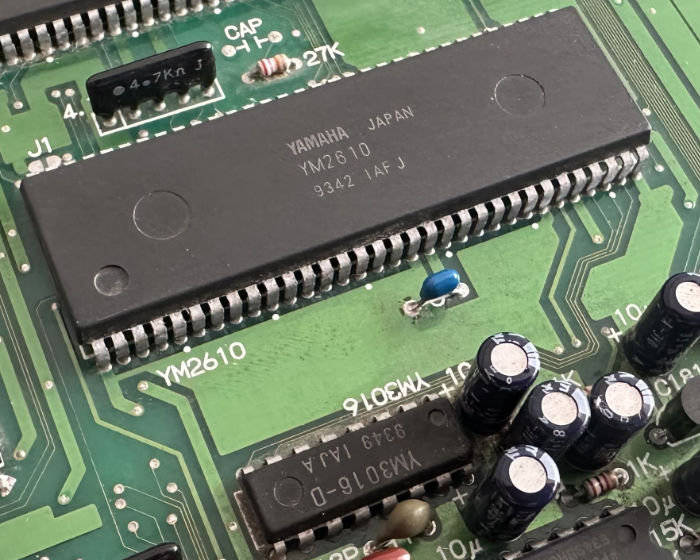
Fig. 4. The Yamaha YM2610 OPNB sound generator and discrete stereo analog output stages.
Motorola 68000 Zilog Z80
| |
| 1. Write command byte to $320000 |
|------------------------------------------>| Hardware triggers NMI at vector $0066
| | Z80 pushes byte into RAM FIFO ring buffer
| | Reply port drops to 0 (Busy)
| |
| 2. Poll status byte at $320000 |
|<------------------------------------------| Driver processes command
| | Reply port rises back to 1 (Ready)
v v
Communication between the CPUs is asynchronous and buffered:
The 68000 writes an 8-bit command byte into REG_SOUND ($320000).
This hardware write asserts the Z80 Non-Maskable Interrupt (NMI) line at vector $0066.
The Z80 NMI service routine reads the latch and enqueues the byte into a circular FIFO ring buffer in Z80 Work RAM.
The Z80 main loop drains the FIFO, verifies parameters, and programs the YM2610 registers.
The 68000 monitors completion via the status latch: the port idles at logic 1, drops to 0 upon receiving a command, and rises back to 1 when acknowledged.
Deadlock Warning: Polling Order
The reply port idles at 1. Therefore, waiting for a 1 immediately after writing without detecting the 0 transition will return instantaneously before the Z80 has even processed the NMI. Conversely, placing an unconditional busy-wait loop immediately after every write can stall the 68000 if the Z80 is servicing a heavy music interrupt. Always use the SDK wrapper soundCommand(), which handles the 1 → 0 → 1 transition safely.
Chapter 21
Z80 Sound Driver Internals & Command Protocol
The official NeoGeoSDK audio driver (sound/driver/driver.asm) is assembled into the M1 ROM. It runs an interrupt-driven audio kernel featuring fractional tempo tracking, volume matrixing, dynamic panning, and command queueing.
Z80 Interrupt Architecture
Vector $0066 (NMI): 68000 Command Arrival. Rapidly reads the hardware port and pushes the command into the 32-byte circular FIFO ring buffer.
Vector $0038 (Timer B IRQ): Hardware Music Tick. Driven by YM2610 internal Timer B at 124.008 Hz. Advances MML music streams, steps FM envelopes, updates fractional tempo counters, and decrements volume fade ramps.
The Yamaha YM2610 provides rich frequency modulation (FM) synthesis and authentic 8-bit programmable sound generation (SSG) directly in silicon.
FM Synthesis: 4-Operator Architecture
Each of the four FM channels is constructed from four independent sine-wave oscillators called Operators (OP1, OP2, OP3, OP4). Each operator possesses its own dedicated envelope generator defined by nine hardware registers:
FM Operator Architecture:
[ Detune (DT) / Multiplier (MUL) ] ==> Sets base frequency ratio
[ Total Level (TL) ] ==> Sets output volume / modulation depth
[ Attack Rate (AR) ] ==> Initial envelope rise time
[ Decay Rate (DR) / Key Scale (KS)] ==> Secondary decay rate & keyboard scaling
[ Sustain Rate (SR) ] ==> Level maintained while key is held
[ Release Rate (RR) ] ==> Final decay time after key release
[ Sustain Level (SL) ] ==> Transition point between Decay and Sustain
The routing between operators is determined by the Algorithm (0–7). In Algorithm 0, all four operators are connected in series (OP1 modulates OP2, which modulates OP3, which modulates OP4), producing complex metallic and harmonic textures. In Algorithm 7, all four operators run in parallel as independent carriers, producing rich polyphonic organs and additive pads.
Low-Frequency Oscillator (LFO) Modulation
Register $22 controls the integrated LFO, generating hardware vibrato (Frequency Modulation Sensitivity, FMS) and tremolo (Amplitude Modulation Sensitivity, AMS). In C, configure the LFO rate using:
The SSG block provides three square-wave tone channels, a 5-bit white noise generator, and a hardware envelope generator. It is ideal for crisp coin chimes, retro laser zaps, and percussive explosions. The SDK provides high-level helpers to play pre-compiled SSG stings:
The YM2610 features two distinct Adaptive Differential Pulse Code Modulation (ADPCM) subsystems that stream compressed digital audio directly from cartridge V-ROM without CPU intervention.
ADPCM-A (6-Channel Sound Effects)
Channels: 6 independent hardware channels.
Sampling Rate: Fixed hardware clock of approximately 18.5 kHz.
Compression: 12-bit dynamic range compressed to 4-bit nibbles.
Memory Limits: Samples are mapped into V-ROM via start and end address tables in M1. An individual ADPCM-A sample cannot cross a 1 MB address boundary.
Stereo Control: Each channel can be steered Left, Right, or Center through registers $08–$0D.
ADPCM-B (High-Fidelity Streaming & Looping)
Channels: 1 dedicated high-fidelity stream.
Sampling Rate: Fully programmable up to 55.5 kHz via 16-bit Delta-N pitch registers ($19–$1A). Standard SDK music beds are encoded at 32 kHz.
Compression: 16-bit linear audio compressed to 4-bit delta encoding.
Hardware Looping: Setting soundSetADPCMBLoop(1) instructs the YM2610 to seamlessly repeat playback when the sample end address is reached, creating gapless background music loops without CPU timing drift.
Speech Synthesis Bank
The NeoGeoSDK driver incorporates an internal pre-compiled speech library encoded as ADPCM-A samples. The 68000 can synthesize full voice phrases with zero disk I/O:
/* Trigger full phonetic speech or pre-compiled words */
speakText("ROUND 1 READY FIGHT");
playVoiceWord(SOUND_VOICE_WORD_GAME_OVER);
playVoiceNumber(player_score);
Chapter 24
Complete Audio Driver Integration & Sound Manager
The following production C module provides a complete Game Sound Manager. It queues audio commands, enforces rate limits, handles dynamic volume ducking during voice lines, and manages seamless music cross-fades during stage transitions.
Converting modern 24-bit RGB PNG artwork into 4 bpp interleaved C-ROM sprite bitplanes and S-ROM FIX glyphs is automated by the Artbox Pipeline (artbox/) and the interactive PyQt6 Artbox Studio.
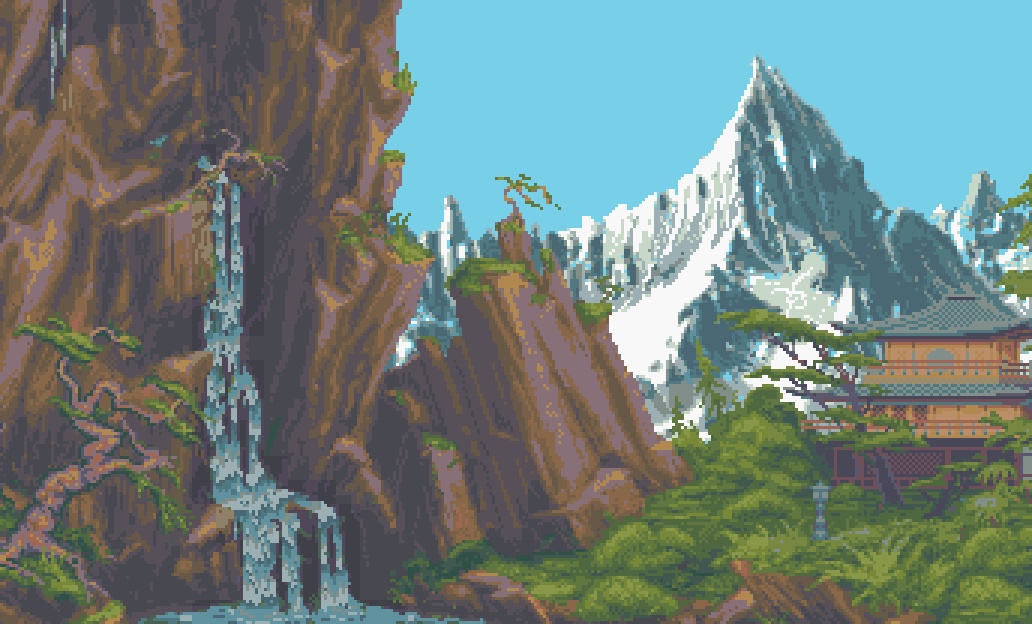
Fig. 5. Multi-layer 16-color pixel art stage scenery processed through the Artbox pipeline for NeoGeoSDK.
Asset Specification: artbox/assets.cfg
Assets are organized into four primary classes in artbox/assets.cfg:
Asset Class
Input Folder
Grid Alignment
Output Destination
Backgrounds
artbox/in/
320x224 or multi-page
Low sprite slots (1–32) for parallax scenery.
Characters
artbox/in/
16x16 pixel increments
Character sprite range (slots 96–223).
Enemies / Bosses
artbox/in/
16x16 pixel increments
Enemy sprite range (slots 160–255).
FIX Overlay Glyphs
artbox/infix/
8x8 pixel grid
S-ROM (S1), mapped to VRAM $7000.
Automated Quantization & Planar Splitting
Color Quantization: The pipeline automatically maps 24-bit PNG colors down to the strict Neo Geo budget: 15 visible colors plus 1 transparent color (index 0) per 16x16 tile.
Palette Banking: If an illustration contains multiple color themes, Artbox groups tiles into optimal 16-color palettes and generates a header mapping table (artbox/sprite_meta.h).
Planar Bitplane Splitting: The encoder separates pixel bitplanes into odd (bitplanes 0 & 1) and even (bitplanes 2 & 3) binary streams for C1/C2 ROM burning.
Interactive Studio GUI Tools
# Launch the visual Artbox Studio (Tile viewer, hitbox editor, animation player)
python3 artbox/artbox_studio.py

# Launch the Sound Studio (FM patch synthesizer, MML composer, ADPCM audition)
python3 sound/sound_studio.py
Chapter 26
Twelve-Step Engineering Roadmap to a Complete Title
Building a commercial-grade Neo Geo game requires a structured, iterative development discipline. Each step produces an independently testable, bootable ROM.
The Bare-Metal Boot (Hello World): Compile games/helloworld. Verify motherboard BIOS boot, watchdog kick, credit LED servicing, and text rendering on the FIX layer.
The USER Subroutine Contract: Implement clean handlers for Request 0 (Soft DIP init), Request 1 (Custom Eyecatcher), Request 2 (Attract Reel), and Request 3 (Title Screen). Ensure BIOS_USER_MODE transitions correctly.
The Head-Up Display (HUD): Construct scoreboards, energy gauges, and credit counters on the FIX layer using ng_fix.h. Verify display on a CRT monitor safe area (columns 1–38, visible rows 0–27).
Color Palette Architecture: Assign palettes: 0 for FIX text, 1–15 for scenery, 16+ for characters. Implement smooth, tear-free palette fade-ins using the Render Queue.
Single Actor Hardware Bring-Up: Upload a 16x16 character strip into slot 96. Drive horizontal and vertical movement via joystick registers. Confirm torus wrapping at coordinate 512.
Action Script Animation States: Define declarative action scripts for Idle, Run, Jump, and Attack using ng_actions.h. Bind joystick edges to animation triggers.
Audio Subsystem Integration: Establish the Z80 sound driver. Fire one-shot ADPCM-A sound effects on attacks, play an ADPCM-B looping bed during gameplay, and trigger coin chimes on deposit.
World Bounds & Scrolling Camera: Expand world boundaries beyond 320x224. Configure camera follow with dead zones and look-ahead. Add a scrolling parallax background in low sprite slots (1–32).
Adversaries, AI & Collision: Spawn enemy NPCs with patrol think callbacks. Detect weapon collisions using AABB rectangles. Trigger hitstop, camera shake, and damage flashes on impact.
The Gameplay Progression Loop: Build wave spawning, item drop tables, boss encounter phases, and stage transition routines.
Attract Mode & High Score Persistence: Implement an attract loop that plays automated demonstration reels. Save top scores and player progress to MVS battery-backed Backup RAM at $D00000.
Final Release Packaging: Compile production ROMs, verify CRCs against the MAME hash XML, and burn physical EPROMs/Flash cartridges.
Chapter 27
Reference Game Analysis: Sky Lance
Sky Lance (games/skylance, NGH ID 779) serves as the complete, reference arcade production within the NeoGeoSDK. It demonstrates every advanced engine capability operating on strict 60 Hz hardware timing.
Production Features
Three selectable fighter pilots with unique handling and fire rates.
Seven distinct vertical scrolling stages spanning oceans, cities, and bases.
Multi-phase boss encounters with compound multi-strip scaling.
Full ADPCM-B looping background music and voice announcements.
Architecture Walkthrough Order
game.mk: Target ROM configuration, ID 779, asset lists.
user.c: BIOS USER callback state transitions.
scenes/scene_play.c: Complete 60 Hz frame game loop.
scenes/pilot_select.c: Character selection carousel.
artbox/assets.cfg: Asset pipeline configuration.
The companion laboratory ROM, games/demo (ID 777), contains 25 interactive chapters demonstrating every single engine module—from starfields and compound sprite scaling to audio ducking and performance profilers.
While modern emulators like MAME provide rapid development turnaround, releasing a commercial-grade Neo Geo game requires rigorous validation across multiple BIOS revisions and physical hardware testing.
Testing with MAME
Launch tests using the official makefile targets, which configure ROM paths and hash definitions automatically:
# Test MVS Arcade mode with European BIOS
make GAME=skylance test

# Test AES Home Console mode
make GAME=skylance test-aes

# Test with UniBIOS 4.0
make GAME=skylance test-unibios
Pre-Release Hardware Sign-Off Checklist
Universal BIOS Boot: Clean boot verified under MVS Japan, MVS USA, MVS Europe, AES, and Universe BIOS without memory errors.
Watchdog Safety: The watchdog counter is refreshed cleanly during boot initialization, attract mode, gameplay, pause, and game-over screens.